 Solo Scores
What do the file status icons mean?
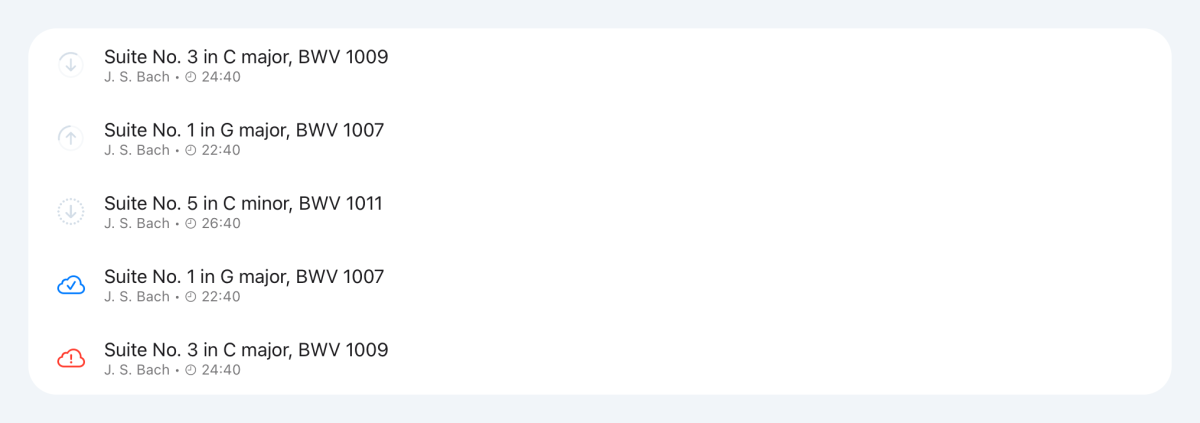
Each score in a list shows an icon for its PDFs, so you can tell at a glance whether they're on your device and ready to open, even offline.
- A turning ring with a down arrow means a PDF is downloading to this device. With an up arrow, a PDF is uploading from it.
- A dotted ring with a down arrow means a part was added on another device, yours or a member's, and that device hasn't finished uploading its PDF yet. Nothing's wrong: it downloads here as soon as the upload finishes. Until then, the part doesn't open, and Edit score shows it as Waiting for upload.
- A ticked cloud means every PDF is on this device.
- A red cloud with an exclamation mark means Solo Scores couldn't transfer a PDF. It keeps trying, and the icon changes once the PDF transfers.
If a part stays waiting
- Open Solo Scores on the device that added the part.
- Keep it open with a connection until its upload finishes.
If you see a red cloud
- Keep Solo Scores open with a connection so it can retry.
- If the red cloud stays, send us feedback with the score and part name. See How do I send feedback or report a problem?
Still need help? Email info@soloapps.co.uk.